%20(1).svg)
If you've forgotten your password or can't log in, you can reset it yourself in a couple of minutes using the login page, or ask our support team to reset it for you.
Before you begin- You know the username or email associated with your Climate Earth account.
- You have access to that email inbox to receive the reset link.
- Didn't get the email? Check spam/junk folders first, and confirm you used the exact email address on file.
- Still no email after a few minutes, or don't have access to that inbox anymore? Contact Customer Support to have your password reset manually — see link below.
- [Link: How do I log in to the Climate Earth portal for the first time?]
- [Link: Who do I contact for account or billing questions?]
1. Go to the Climate Earth portal login page.
2. Below the password field, click Forgot your password?
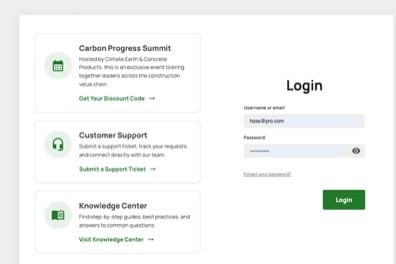
Login page — the "Forgot your password?" link sits below the password field
3. Enter the username or email on your account and submit the request.
4. Check that inbox for an email from Climate Earth with password reset instructions.
5. Follow the link in the email to set a new password.
Expected resultYou'll receive an automated email with a link to create a new password. Once you set it, you can log in to the portal with your new credentials.
Troubleshooting- Didn't get the email? Check spam/junk folders first, and confirm you used the exact email address on file.
- Still no email after a few minutes, or don't have access to that inbox anymore? Contact Customer Support to have your password reset manually — see link below.
You can reach Customer Support directly here: Submit a Support Ticket